How Smart Thermostats Work
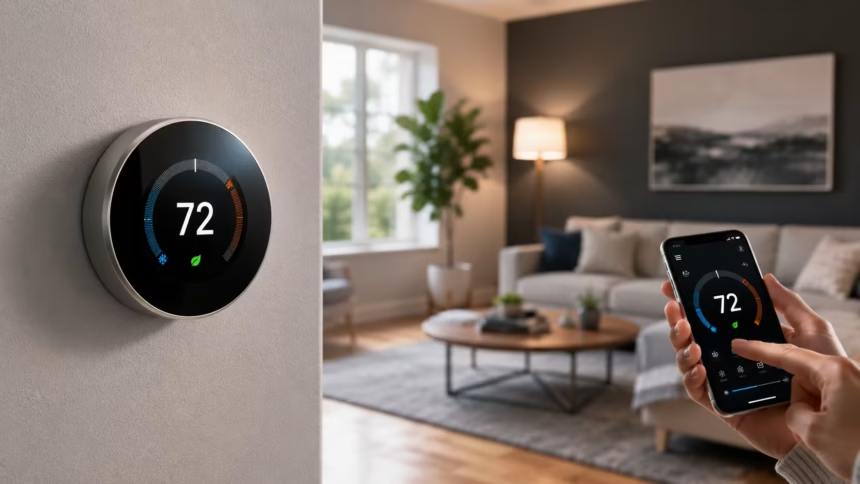
Smart thermostats have changed the way people control heating and cooling at home. Instead of adjusting the temperature manually throughout the day, homeowners can create schedules, make changes from a phone, and allow the thermostat to respond automatically to routines, weather, and occupancy.
At the most basic level, a smart thermostat performs the same job as a traditional thermostat. It measures the indoor temperature, compares it with the chosen setting, and tells the heating, ventilation, and air conditioning system when to turn on or off. The difference lies in how much information it can process.
A Wi-Fi thermostat may connect with mobile apps, voice assistants, remote sensors, utility programs, and other smart home devices. Some models also study temperature preferences over time and recommend adjustments that may reduce unnecessary heating and cooling without making the home uncomfortable.
Understanding how smart thermostats work can help you decide whether one is right for your home. This guide explains their sensors, connectivity, automation features, HVAC compatibility, installation requirements, energy-saving potential, privacy considerations, and everyday benefits.
What Is a Smart Thermostat?
A smart thermostat is an internet-connected device that controls a home’s heating and cooling system. It replaces or works alongside a conventional wall thermostat while providing additional features such as remote access, automated schedules, energy reports, and smart home integration.
Like a basic thermostat, it contains a temperature sensor that monitors the surrounding air. When the room becomes warmer or cooler than the selected target, the thermostat sends an electrical signal to the HVAC equipment to begin heating or cooling.
The device becomes “smart” through software, connectivity, and additional sensors. It can store schedules, respond to commands from a mobile app, detect when people are home, and adjust settings based on information collected over time.
Not every smart thermostat offers the same features. Some focus mainly on Wi-Fi control, while more advanced models include learning technology, geofencing, room sensors, humidity monitoring, energy-use insights, and compatibility with wider smart home systems.
How Smart Thermostats Control an HVAC System
A smart thermostat acts as the control centre between the homeowner and the HVAC system. It does not generate heat or cool air itself. Instead, it tells the furnace, boiler, air conditioner, heat pump, or fan when operation is needed.
The thermostat continuously compares the measured room temperature with the set temperature. If the home is colder than the heating target, it completes a low-voltage circuit that starts the heating system. Once the target is reached, it signals the system to stop.
Cooling works in a similar way. When the indoor temperature rises above the selected setting, the thermostat activates the air conditioner or heat pump. It may also control the blower fan that moves conditioned air through the home’s ducts.
More advanced HVAC systems can support several stages of heating or cooling. A compatible smart thermostat may activate a lower stage for mild temperature changes and a stronger stage when more heating or cooling power is required.
The Sensors Inside a Smart Thermostat
Temperature sensors are the most essential components inside a smart thermostat. They measure the air around the device and help determine when the HVAC system should operate. Accurate placement is important because sunlight, drafts, kitchens, and exterior doors can distort readings.
Many models also contain humidity sensors. Indoor humidity can affect how warm or cool a room feels, so this information may help the thermostat manage comfort more effectively. Some systems can also control compatible humidifiers, dehumidifiers, or ventilation equipment.
Occupancy and motion sensors allow certain thermostats to recognize activity near the device. If no movement is detected for an extended period, the system may switch to an energy-saving temperature rather than maintaining full comfort settings in an apparently empty home.
Remote room sensors expand the thermostat’s awareness beyond one hallway or living area. They can measure temperature and occupancy in bedrooms, offices, or other rooms, allowing the system to prioritize spaces that are currently being used.
How Wi-Fi Connectivity Works
A Wi-Fi thermostat connects to the home’s wireless network in much the same way as a phone, tablet, or smart speaker. This connection allows the thermostat to communicate with its manufacturer’s online service and the associated mobile application.
When you change the temperature through the app, the command travels through the internet to the thermostat. The device then sends the appropriate control signal to the HVAC system, even when you are away from home.
Internet connectivity also enables software updates, weather information, energy reports, and smart home integrations. A manufacturer may use updates to improve performance, fix security problems, add features, or maintain compatibility with mobile operating systems.
Most smart thermostats continue controlling basic heating and cooling if the internet connection stops working. However, remote access, weather-based automation, voice commands, and cloud-dependent features may remain unavailable until the connection returns.
How the Mobile App Controls Temperature
A smart thermostat app provides a digital version of the wall controls. Users can normally view the current indoor temperature, change the target setting, adjust the fan, select heating or cooling mode, and check whether the HVAC system is running.
Remote temperature control is especially useful when plans change. You can reduce energy use after leaving home unexpectedly or begin heating or cooling before returning from work, travel, or an evening outside.
The app may also send alerts about unusual temperatures, high humidity, equipment runtime, air-filter replacement, or a possible system problem. These notifications can help homeowners notice issues before they lead to severe discomfort or property damage.
Access can often be shared with other household members. However, users should manage permissions carefully because anyone with account access may be able to change schedules, view occupancy-related information, or control connected equipment.
How Smart Thermostat Scheduling Works
A schedule tells the thermostat what temperature to maintain at different times. For example, the system may keep the home comfortable in the morning, use a more efficient setting during working hours, and return to a preferred temperature before bedtime.
Traditional programmable thermostats can also follow schedules, but smart models usually make them easier to create and edit. Instead of navigating small buttons on a wall display, users can adjust the complete weekly plan from a mobile app.
Schedules can differ by day, allowing separate settings for weekdays and weekends. Some thermostats support several periods each day, such as waking, leaving, returning home, evening relaxation, and sleeping.
A useful schedule should reflect the household’s actual routine. Extreme temperature changes may create discomfort and may not always produce greater savings, particularly in homes with heat pumps or systems that recover slowly.
How Learning Thermostats Understand Your Routine
A learning thermostat attempts to recognize patterns in the way people adjust the temperature. It may observe when settings are changed, how long the home takes to heat or cool, and when household members usually arrive or leave.
After collecting enough information, the device may create or suggest an automatic schedule. For example, it could notice that the temperature is lowered every night and begin making the same adjustment without requiring a manual command.
The thermostat may also learn how the building responds to outdoor conditions. A well-insulated home may retain heat for hours, while another property loses temperature quickly. This information can help the device start the HVAC system at a more appropriate time.
Learning features are optional on many models and may not suit every household. People with unpredictable schedules may prefer manual programming, geofencing, or simple app control rather than allowing the thermostat to make frequent automatic adjustments.
How Geofencing Changes the Temperature
Geofencing uses the location of a household member’s phone to estimate whether anyone is home. The app creates a virtual boundary around the property and watches for authorized devices entering or leaving that area.
When everyone leaves, the thermostat can switch to an energy-saving setting. As someone approaches home, it may begin restoring a comfortable temperature so the building is ready by the time that person arrives.
This feature can help households whose schedules change from day to day. It reduces the need to remember to adjust the thermostat manually every time someone leaves the property.
Geofencing depends on accurate phone location, app permissions, battery settings, and mobile connectivity. It should also be configured for every relevant household member so the system does not reduce heating or cooling while someone remains at home.
How Occupancy Detection Works
Occupancy detection uses built-in or remote sensors to determine whether particular areas appear to be in use. Motion, proximity, and other signals may help the thermostat decide when to maintain comfort or activate an away setting.
A sensor cannot always tell the difference between an empty room and a person sitting very still. Someone reading, sleeping, or working quietly may not create enough movement to be detected consistently.
For this reason, many systems combine occupancy data with schedules, phone location, and manual settings. Using several sources can reduce the chance of the thermostat making an inconvenient temperature change.
Occupancy sensing can be useful in homes with irregular routines. It may also help prioritize occupied bedrooms or living spaces when remote temperature sensors are installed throughout the property.
How Remote Room Sensors Improve Comfort
A traditional thermostat controls the HVAC system using the temperature measured at one wall location. That location may not represent the entire house, especially when upstairs rooms, sunny spaces, basements, and bedrooms heat or cool differently.
Remote sensors measure conditions in additional rooms. The thermostat may average their readings, follow one selected room, or prioritize spaces where occupancy is detected, depending on the product and settings.
For example, a hallway thermostat may show a comfortable temperature while a bedroom remains too warm. A bedroom sensor can give the system information that better reflects where people are sleeping.
Room sensors improve awareness but do not automatically create independent temperature zones. True zoning normally requires separate duct dampers, multiple HVAC units, or compatible zoned equipment that can control different parts of the home individually.
How Smart Thermostats May Save Energy
Smart thermostats can reduce energy waste by limiting unnecessary heating and cooling. They may adjust the temperature while the home is empty, create efficient schedules, and prevent the HVAC system from running longer than needed.
Energy reports can show how many hours the system operates and how temperature changes affect runtime. This feedback may encourage homeowners to choose slightly more efficient settings without sacrificing reasonable comfort.
Weather-based features may also adjust operation according to outdoor temperature and humidity. Some thermostats prepare for expected conditions or recommend changes during periods of unusually high energy demand.
Savings are not guaranteed and vary by climate, insulation, system efficiency, household habits, and previous thermostat use. Someone who already follows an efficient schedule may see a smaller benefit than a household that frequently leaves heating or cooling running in an empty home.
How Energy Reports Help Homeowners
Many smart thermostat apps provide daily, weekly, or monthly energy summaries. These reports may show HVAC runtime, recent temperature settings, estimated consumption patterns, and comparisons with earlier periods.
The data can reveal how strongly weather affects the system. A sudden increase in runtime during a heatwave may be normal, while unexpectedly long operation during mild weather could suggest an inefficient setting or equipment problem.
Some reports explain why energy use changed. The app may identify weather, manual adjustments, schedule changes, or increased occupancy as possible reasons for longer heating or cooling cycles.
These reports are usually estimates rather than direct measurements of total household energy use. A utility bill, smart meter, or dedicated energy monitor may provide more complete information about actual electricity or fuel consumption.
Smart Thermostats and Time-of-Use Electricity Rates
Some electricity providers charge different rates depending on the time of day. Energy may cost more during busy evening periods and less during overnight or off-peak hours.
A compatible smart thermostat may reduce heating or cooling slightly during expensive peak periods. It can sometimes prepare the home beforehand by reaching a comfortable temperature while electricity rates are lower.
This strategy is often called preheating or precooling. The building itself temporarily stores some thermal energy, allowing the HVAC system to operate less during a costly period.
Participation should remain comfortable and appropriate for the household. Older adults, young children, pets, and people with medical conditions may require narrower temperature limits regardless of electricity prices.
How Smart Thermostats Work With Heat Pumps
Heat pumps provide both heating and cooling by transferring heat rather than generating it directly. Many smart thermostats support heat pumps, but compatibility must be confirmed before installation.
In cold weather, some heat pump systems use auxiliary or emergency heat. This backup source may use considerably more energy, so a compatible thermostat should control it carefully and avoid activating it unnecessarily.
Large temperature setbacks can sometimes cause a heat pump to use auxiliary heat while recovering. A smaller and steadier adjustment may be more efficient, depending on the equipment, climate, and thermostat settings.
Specialized heat pump controls may account for outdoor temperature, compressor stages, defrost cycles, and backup heating. Correct configuration is essential because an incorrect setup can reduce comfort, increase energy use, or prevent the system from operating properly.
Smart Thermostat Compatibility With HVAC Systems
Not every smart thermostat works with every heating and cooling system. Compatibility depends on the equipment type, voltage, number of stages, wiring, fuel source, and control method.
Many homes use low-voltage central HVAC systems that are compatible with popular smart thermostats. However, electric baseboard heaters, millivolt systems, proprietary communicating equipment, and some older boilers may require specialized devices.
The thermostat manufacturer usually provides an online compatibility checker. Users enter the labels of existing thermostat wires or information about the HVAC system to determine whether installation is likely to work.
Compatibility should be verified before purchasing. When wiring is unclear, the system is unusually complex, or the existing thermostat uses proprietary controls, an HVAC technician can identify a suitable option and prevent equipment damage.
What Is a C-Wire?
The C-wire, also called the common wire, provides continuous low-voltage power to a thermostat. Smart thermostats often need this constant supply because Wi-Fi, touchscreens, sensors, and processors use more electricity than a basic thermostat.
Common wire labels may include “C” at the thermostat and HVAC control board. However, wire colours are not completely standardized, so the terminal label is more reliable than the insulation colour.
Some smart thermostats can work without a traditional C-wire by using rechargeable batteries or drawing small amounts of power through other circuits. This method may not perform reliably with every HVAC system.
When no C-wire is available, possible solutions include using a manufacturer-approved power adapter, installing a new thermostat cable, or adding a compatible accessory at the HVAC equipment. Electrical power should be turned off before thermostat wiring is handled.
How Smart Thermostat Installation Works
Installation usually begins by switching off power to the heating and cooling equipment. The existing thermostat cover is removed, and the wires are photographed and labelled before they are disconnected.
The old wall plate is then replaced with the new thermostat base. Each wire must be connected to the correct terminal according to the equipment type and the manufacturer’s instructions.
After the thermostat is attached and power is restored, the setup process normally asks about the HVAC system. Users may need to identify the heating fuel, number of stages, heat pump configuration, and connected accessories.
The final steps include joining the Wi-Fi network, installing the mobile app, creating a schedule, and testing heating, cooling, and fan operation. Professional installation is advisable when the system has unfamiliar wiring or complex controls.
Smart Home and Voice Assistant Integration
Smart thermostats can often connect with voice assistants and home automation platforms. This allows users to change the temperature, switch modes, or ask for the current indoor reading using spoken commands.
Automation routines can connect temperature control with other devices. A “leaving home” routine might reduce heating or cooling, turn off lights, lock doors, and activate a security system with one command.
Some newer devices support broader interoperability standards that allow compatible smart home products from different brands to work together more easily. Actual features still depend on the thermostat, platform, and HVAC equipment.
Smart home integration is convenient, but unnecessary automation can create conflicts. Users should review schedules and routines carefully so that several platforms do not repeatedly override one another’s temperature settings.
How Weather Data Influences Smart Thermostats
An internet-connected thermostat can access local weather information, including outdoor temperature, humidity, and forecasts. This data helps provide context that an indoor sensor alone cannot capture.
The thermostat may start heating earlier on a very cold morning because it knows the home will warm more slowly. During mild weather, it may delay operation because the building can reach the desired temperature more quickly.
Some models display outdoor conditions on the wall screen or app. Others use weather information quietly in the background to improve energy reports, scheduling, or equipment control.
Weather data is usually based on a nearby reporting station rather than a sensor at the home. Local shade, wind, building materials, and direct sunlight may therefore create conditions that differ slightly from the reported outdoor temperature.
How Smart Thermostats Handle Multiple Zones
A zoned HVAC system divides the building into areas that can be controlled separately. Each zone may have its own thermostat, temperature sensor, duct damper, or heating and cooling equipment.
Smart thermostats can work with zoning when the HVAC configuration supports it. Separate thermostats may control upstairs and downstairs areas, bedrooms and living spaces, or different sections of a large property.
Zoning can improve comfort by avoiding the need to heat or cool every room to the same temperature. It may also reduce waste when unused sections of the building require less conditioning.
Installing smart thermostats alone does not create zoning. The home must already have compatible zone controls, or an HVAC contractor must add the necessary dampers, controllers, wiring, or equipment.
How Smart Thermostats Protect a Home
Temperature alerts can warn homeowners when a house becomes unusually hot or cold. This may help identify HVAC failure, frozen-pipe risk, excessive heat, or a door or window that has been left open.
Humidity alerts may reveal conditions that support condensation, discomfort, or mould growth. The thermostat cannot fix every humidity problem, but the warning can encourage further investigation.
Some systems also provide equipment-monitoring alerts. An unusually long heating cycle, frequent starts, or failure to reach the selected temperature may suggest that maintenance is needed.
These alerts are helpful but should not replace smoke alarms, carbon monoxide detectors, leak sensors, or professional HVAC maintenance. A thermostat monitors comfort-related conditions rather than every household safety hazard.
Smart Thermostat Privacy and Security
Smart thermostats may collect information about temperature settings, device activity, energy patterns, account details, and whether the home appears occupied. Some features also use phone location to support geofencing.
Users should review the manufacturer’s privacy policy to understand what information is collected, why it is needed, how long it is stored, and whether it may be shared with service providers or utility programs.
Strong account security is important because remote access allows someone to control the home’s temperature. Use a unique password, enable multi-factor authentication when available, and keep the app and thermostat software updated.
The home Wi-Fi network should also be protected with modern encryption and a strong router password. Avoid purchasing unsupported devices that no longer receive security updates, particularly when they depend heavily on cloud services.
Do Smart Thermostats Work Without the Internet?
Basic thermostat functions usually continue when the internet is unavailable. You can generally adjust the temperature from the wall display, and the device can still follow schedules stored locally.
Remote app control will normally stop working during an outage. Weather data, voice assistant commands, cloud-based reports, and some advanced automations may also become temporarily unavailable.
The thermostat must still have electrical power to control the HVAC system. During a full household power failure, most central heating and cooling equipment will not operate even if the thermostat has a battery.
Once internet service returns, the thermostat usually reconnects automatically. Any missed cloud data may be synchronized later, depending on the device and service.
Smart Thermostat vs Programmable Thermostat
A programmable thermostat follows a schedule that the user enters manually. It can reduce energy use effectively when the schedule matches the household’s routine and someone remembers to update it when plans change.
A smart thermostat adds internet connectivity, remote control, app-based scheduling, alerts, reports, and possible automation. Learning models may also suggest or create schedules based on observed behaviour.
The best option depends on personal needs. A household with a predictable routine and no interest in mobile control may be satisfied with a basic programmable thermostat.
A smart model may offer more value to people with changing schedules, multiple properties, remote room sensors, utility-rate programs, or a strong interest in tracking energy use.
Common Smart Thermostat Problems
Connection problems can occur when the thermostat is too far from the router, the Wi-Fi signal is weak, or network settings have changed. Restarting the router and reviewing the app’s connection instructions may resolve simple issues.
Incorrect temperature readings may result from poor thermostat placement. Direct sunlight, nearby vents, exterior walls, appliances, and drafts can make the sensor report conditions that do not represent the rest of the home.
Short cycling, frequent reboots, or a blank screen may indicate a power or wiring problem. An absent or improperly installed C-wire is a common concern, although HVAC equipment faults can produce similar symptoms.
Unexpected schedule changes may come from learning features, geofencing, utility programs, or connected smart home routines. Reviewing the activity history can help identify which automation changed the setting.
How to Choose the Right Smart Thermostat
Start by checking HVAC compatibility. Confirm the system type, voltage, heat pump configuration, wiring, heating stages, cooling stages, and whether accessories such as humidifiers or ventilators need control.
Consider which features will genuinely improve daily life. Remote access, simple scheduling, room sensors, geofencing, energy reports, and voice control are useful only when they match the household’s needs.
Review the long-term software support and smart home platforms available. A thermostat may remain on the wall for many years, so reliable updates and compatibility can matter as much as the touchscreen design.
Price should include possible installation costs, accessories, remote sensors, subscriptions, and wiring work. Local utilities or energy programs may offer incentives, but eligibility and conditions vary by location.
Are Smart Thermostats Worth It?
A smart thermostat can be worthwhile for households that frequently forget to adjust the temperature or have schedules that change throughout the week. Remote access and automation can make comfort easier to manage.
The device may also help people understand their HVAC use. Energy reports, alerts, and runtime information can reveal habits or equipment behaviour that were previously difficult to notice.
However, a smart thermostat cannot overcome poor insulation, leaking ducts, inefficient equipment, or extreme temperature settings. Home maintenance and sensible use still have a major influence on comfort and energy costs.
Its value depends on compatibility, household habits, climate, installation costs, and which features will actually be used. For some people, convenience is the main benefit, while others value energy management or remote property monitoring.
How Smart Thermostats Work in Everyday Life
Smart thermostats measure indoor conditions, compare them with selected settings, and signal the HVAC system to heat or cool the home. Their core function remains similar to that of a traditional thermostat.
Sensors, Wi-Fi connectivity, apps, schedules, and automation make the system more responsive. Features such as learning, geofencing, room sensors, and weather data can help the thermostat adapt to changing routines.
Potential energy savings come from reducing unnecessary operation rather than from the device creating energy itself. Results depend on how the thermostat is configured and how efficiently the wider home and HVAC system perform.
Choosing the right model begins with compatibility and practical needs. When installed and configured correctly, a smart thermostat can provide better control, useful insights, and a more convenient way to manage home comfort.
Frequently Asked Questions
Do smart thermostats really save energy?
They can reduce energy waste by using schedules, occupancy information, and remote control. Actual savings depend on climate, previous habits, insulation, HVAC efficiency, and chosen settings.
Can I install a smart thermostat myself?
Many low-voltage systems support do-it-yourself installation. Professional help is safer when wiring is unclear, a C-wire is missing, or the HVAC system uses complex or proprietary controls.
Does a smart thermostat work without Wi-Fi?
Most models continue basic heating, cooling, and stored schedules without Wi-Fi. Remote app access, voice control, weather information, and some automations will usually stop temporarily.
Can a smart thermostat work with any HVAC system?
No. Compatibility depends on voltage, equipment type, wiring, stages, and control technology. Always use the manufacturer’s compatibility checker or consult an HVAC professional before purchasing.
What is the best temperature for a smart thermostat?
There is no single ideal setting for every home. Choose a comfortable temperature, use modest adjustments when the home is empty, and consider household health needs, climate, and HVAC type.