How Long Does Target Hold Pick Up Orders? Deadlines and Extensions Explained
Target Order Pickup and Drive Up make it possible to shop online and collect your items without walking through the store. However, plans can change after you place an order, leaving you wondering how long Target will keep everything before returning the products to store inventory.
Most Target pickup orders are held for three days after they become ready for collection. The exact deadline appears in your order details, ready-for-pickup email, or Target app notification. You should rely on that displayed date rather than counting three days from the moment you submitted the order.
Different rules apply when an order contains fresh or frozen groceries. These temperature-sensitive orders have a much shorter pickup window because Target cannot safely store them for several days. Starbucks Café items added to a Drive Up order follow an even shorter freshness period.
Target may let you extend an eligible pickup order when you cannot arrive before the original deadline. Extensions are not available for every order, so checking the app early is important. This guide explains Target pickup hold times, extensions, cancellations, refunds, and collection requirements.
The Quick Answer: How Long Does Target Hold Pickup Orders?
Target holds most standard Drive Up and Order Pickup orders for three days. The holding period generally begins after the store finishes preparing the order and marks it as ready. Your pickup deadline should be clearly displayed in the Target app or your online order details.
When an order does not contain fresh or frozen groceries, you may be able to extend the pickup window by another three days. The extension must be requested before the original deadline expires. This can give you a total pickup period of up to six days for an eligible order.
Fresh and frozen grocery orders are normally held until the close of the next business day. They cannot receive the additional three-day extension available for many non-perishable orders. The shorter window helps protect food quality, temperature control, and product safety.
If you miss the deadline, Target automatically cancels the uncollected order and issues a refund to the original payment method. The items are then returned to store inventory when appropriate. You may need to place a new order if you still want the products.
When Does the Target Pickup Window Begin?
The pickup window does not necessarily begin at the exact time you place the order. Target must first locate, prepare, and confirm the available items. The order becomes ready only after the store has completed this process and sent you a notification.
Most Target pickup orders are prepared within approximately two hours. However, some stores may require up to six hours because of order volume, staffing, item location, or local demand. The estimated preparation time is usually shown during checkout.
You should wait for the ready-for-pickup notification before travelling to the store. An order confirmation only means Target received your purchase request; it does not mean the items are already waiting at the pickup counter or Drive Up area.
Once the order is marked ready, review the collection deadline shown in Order Details. This date is more reliable than manually calculating the holding period. It also helps you identify whether groceries or other special items have shortened the available window.
How Long Does Target Hold a Standard Order Pickup?
A standard Order Pickup containing clothing, household supplies, toys, beauty products, electronics, or similar non-perishable items is normally held for three days. You can collect it from the Order Pickup or Guest Services area during the store’s operating hours.
The order remains associated with your Target account throughout the holding period. You can view its status, pickup barcode, deadline, and eligible management options through Purchase History. Target may also send reminder emails or app notifications before the order expires.
The three-day policy gives shoppers some flexibility without requiring the store to reserve inventory indefinitely. Popular products may be unavailable to other customers while they are being held. Automatic cancellation eventually allows the store to return unclaimed items to available inventory.
Do not assume that every order will be kept beyond the stated deadline as a courtesy. Store employees may be unable to retrieve an order after automatic cancellation has occurred. Extending the order through the app before expiration is more dependable than calling after the deadline.
How Long Does Target Hold Drive Up Orders?
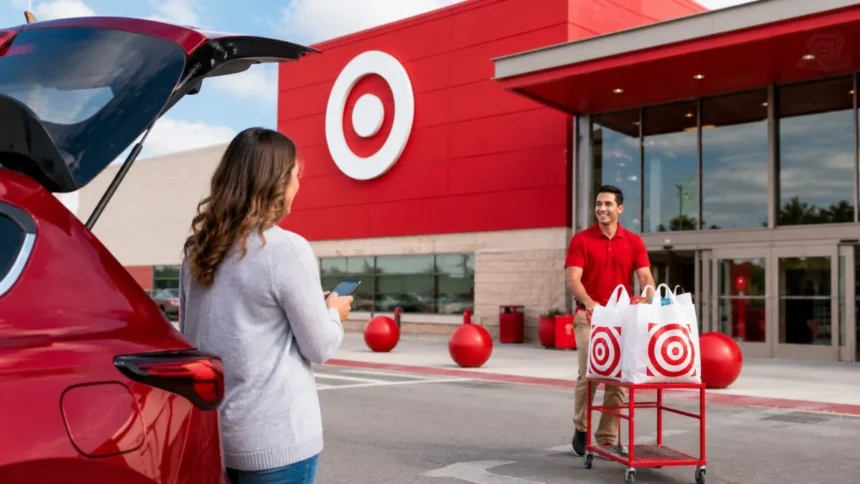
Most Drive Up orders are also held for three days, just like standard in-store pickup orders. The main difference is how you receive the items. With Drive Up, a Target employee brings the prepared order to your vehicle in a designated parking space.
The Target app is important for completing a Drive Up collection. Before leaving, you select the option that tells the store you are on your way. When you arrive, you confirm your location and parking space so the team can bring out the order.
You can often switch between Drive Up and in-store Order Pickup after the order is ready. This option may be useful when the weather changes, the parking area is busy, or you decide that collecting from Guest Services will be more convenient.
Switching the collection method does not normally create a new three-day holding period. The original order deadline remains important. Check the updated Order Details screen rather than assuming that changing from Drive Up to in-store pickup resets the clock.
How Long Does Target Hold Fresh or Frozen Groceries?
Orders containing fresh or frozen groceries are normally held until the close of the next business day. This rule is much shorter than the standard three-day period because products such as meat, dairy, produce, ice cream, and frozen meals require controlled storage.
The exact deadline may depend on when the store prepares the order and its business hours. For example, an order completed late in the day may remain available through the following business day. Always check the displayed pickup deadline rather than making assumptions.
Target does not allow the pickup window for fresh or frozen grocery orders to be extended. Even when only one item in the order is temperature-sensitive, the order may follow the shorter grocery deadline. Separating groceries from other products may offer greater flexibility when placing future orders.
Collect grocery orders as soon as practical after receiving the ready notification. Prompt collection helps preserve freshness and reduces the time frozen items spend moving between storage and your home. Bring an insulated bag or cooler when you have a long journey or hot weather.
How Long Does Target Hold Starbucks Drive Up Items?
Starbucks Café items added to an eligible Target Drive Up order follow a much shorter timeline. Target can normally keep temperature-sensitive Starbucks drinks and food fresh for only 30 minutes after you place the Starbucks portion of the order.
The Starbucks order is usually prepared after you indicate that you are travelling to the store. This approach is designed to reduce the time a hot drink cools or an iced drink melts. You should leave for Target promptly after confirming the order.
When you take more than 30 minutes to arrive, Target may discard the affected items for freshness or temperature-safety reasons. The Starbucks portion may then be refunded. Your main Target merchandise order can remain available under its separate pickup deadline.
Plan the Starbucks addition only when you are nearly ready to leave. Do not add a prepared drink several hours before you expect to arrive. Traffic, distance, and store location should all be considered before starting the Starbucks Drive Up order.
Can You Extend a Target Pickup Order?
Yes, Target allows many pickup orders to be extended for an additional three days. The order must not contain fresh or frozen groceries, and the extension needs to be completed before the original pickup window expires. An expired order cannot usually be restored through the normal extension tool.
When eligible, the extension option appears on the order details page. Open the Target app or Target.com, locate Purchase History, select the order, and follow the option to extend the pickup period. Review the new deadline after completing the request.
The additional three days generally create a total collection window of up to six days. Target may allow only one extension, so you should treat the updated deadline as final. Make plans for yourself or an approved pickup person to collect the items within that period.
If the extension option does not appear, the order may contain ineligible items or be too close to cancellation. The displayed deadline remains active unless Target confirms otherwise. Contacting the store does not guarantee that employees can override the system.
How to Extend a Target Pickup Order in the App
Open the Target app and sign in to the account used to place the order. Go to the account or My Target section, open Purchase History, and select the pickup order you need to manage. The page should display the current status and pickup deadline.
Look for an option such as Extend pickup or Extend your pickup window. Select it and review the new date before confirming. The option will normally appear only when the products and order status qualify for an extension.
Complete the extension before the original holding period ends. Waiting until the final minute can be risky because app issues, time-zone confusion, store closing times, or automatic processing may prevent the request from being accepted.
After extending the order, reopen the details and confirm that the deadline has changed. A screenshot can help you keep the date available, but the live order page remains the best source of information. Enable order notifications so you do not overlook further reminders.
Which Target Pickup Orders Cannot Be Extended?
Orders containing fresh or frozen groceries cannot receive the standard three-day extension. Temperature-sensitive items have limited safe storage periods, so Target cannot continue holding them for several additional days merely because the shopper is unavailable.
An order that has already expired or entered automatic cancellation is also unlikely to be eligible. Once the system releases the reserved products, store employees may not be able to recreate the original order. You may have to purchase the items again.
Certain specialised or restricted items may follow different rules displayed during checkout or in Order Details. Product availability, legal requirements, and store operations can affect how an order is managed. The extension button is the clearest sign that your current order qualifies.
When you know you need more time, check eligibility immediately after the order becomes ready. Do not wait for the cancellation email. Early action gives you time to arrange an alternate pickup person if the order cannot be extended.
What Happens If You Miss the Target Pickup Deadline?
Target automatically cancels a pickup order that is not collected within the applicable holding period. For most orders, this happens after three days unless you successfully extend the deadline. Grocery orders may be cancelled after the close of the next business day.
The reserved merchandise is released and may return to the store’s available inventory. Availability is not guaranteed after cancellation, particularly for sale items, seasonal products, limited releases, or merchandise with low stock levels.
Target sends cancellation information by email and may also update the order status in the app. Check the message carefully because it should identify which items were cancelled. Orders split across locations or fulfilment methods may have different statuses for different items.
When you still need the products, search for them again and place a new order. Prices, promotions, Target Circle offers, and inventory may have changed since the first purchase. Target is not necessarily required to recreate an expired promotion after automatic cancellation.
Will Target Refund an Uncollected Pickup Order?
Yes, Target issues a refund when an uncollected Drive Up or Order Pickup order is cancelled after its holding period. The money is returned to the original payment method rather than automatically issued as store credit.
Refund timing depends on the bank, card issuer, and payment type. Target can initiate the refund promptly, but it may take several business days to appear on your account. Pending authorisation holds can also make the transaction look confusing temporarily.
When you used more than one payment method, refunds may be divided according to how the order was originally paid. For example, a Target GiftCard portion and a bank-card portion may be returned separately to their respective payment sources.
Review your Target order details and financial account before reporting a missing refund. If the cancellation is confirmed but the money has not returned after the expected processing period, contact Target Guest Services and then your payment provider when necessary.
Are You Charged Before Picking Up a Target Order?
Target generally charges the selected payment method when the order is marked ready for pickup. Before that point, you may see a temporary authorisation hold used to confirm that the payment method is valid and that sufficient funds or credit are available.
An authorisation hold is not always the same as a completed charge. When the order total changes because of unavailable products, substitutions, or bag fees, the final amount may differ from the initial pending amount shown by your bank.
When an order is cancelled because you missed the pickup window, Target refunds the applicable completed charge. Your bank controls how quickly the refund or released authorisation becomes visible. This may create a short period in which both entries appear in your account activity.
Avoid placing an immediate duplicate order when the available balance on your card is limited. Confirm whether the first transaction is a charge, refund, or pending hold. Your bank can explain how pending transactions affect your account.
Can Someone Else Pick Up Your Target Order?
Target may allow you to add an alternate pickup person, sometimes called a shopping partner, to an eligible Order Pickup order. This can help when you are working, travelling, ill, or otherwise unable to visit before the deadline.
Add or update the pickup person through the order details when that feature is available. Make sure the person’s information is accurate and that they know which Target location holds the order. They should wait until the order is confirmed ready.
The alternate person may need the relevant pickup information and valid identification. Requirements can vary depending on how the order was configured. Review the instructions shown in the app or notification rather than sending someone without the necessary details.
Adding a pickup person does not extend the deadline. The order still needs to be collected within its original or successfully extended window. Make the change early enough for the other person to plan the trip.
What Do You Need for Target Order Pickup?
For in-store Order Pickup, open the ready order in the Target app and display the pickup barcode to the employee. The barcode may also be available through Target.com under Order Details. Having it ready can make the collection process faster.
When you cannot access the barcode, Target may accept an eligible, unexpired government-issued photo ID. The name and order details should match the authorised pickup information. Bringing the payment card is generally not required because the online payment is already processed.
Go to the Order Pickup or Guest Services desk and follow store signage. Large items may require additional help or a different collection area. Make sure your vehicle has enough space when collecting furniture, televisions, storage products, or other bulky purchases.
Check the order before leaving whenever practical. Confirm the number of bags and any fragile or high-value items. If something is missing or incorrect, speaking with Guest Services immediately may be easier than resolving the issue after returning home.
What Do You Need for Target Drive Up?
Drive Up requires the Target app on a compatible mobile device. Open the ready order and select I’m on my way before leaving for the store. This notification gives the Target team time to prepare your bags for curbside handoff.
When you arrive, park in a clearly marked Drive Up space and select I’m here in the app. Enter or confirm the parking-space number and vehicle details when requested. Keep the pickup verification code or barcode visible for the employee.
A Target team member will bring the items to your vehicle and verify the order. Indicate where you want the bags placed, such as the boot, rear seat, or another accessible area. Make sure the selected space is clear before the employee arrives.
Do not select I’m here before you have actually parked. Accurate arrival notifications help the store coordinate orders and reduce waiting times. When the app is not working, follow the available help instructions or visit Guest Services.
Can You Change From Order Pickup to Drive Up?
Target often lets shoppers switch between Drive Up and in-store Order Pickup after an order becomes ready. The option is generally available through the Target app. This flexibility can be useful when mobility, weather, time, or family circumstances change.
Open the order details and choose the option to tell Target you are coming or display the pickup barcode. The screen may provide a button to switch to Drive Up or switch to in-store pickup. Follow the prompts for the new method.
Drive Up availability depends on the store and item eligibility. Some orders may require collection inside because of product size, age verification, local restrictions, or other operational considerations. The app will show the available choices for that order.
Changing the pickup method does not normally extend how long Target holds the order. The deadline remains connected to the original prepared order. Review the collection date immediately after making the change.
Why Was My Target Pickup Order Cancelled Early?
An order can be cancelled before the expected pickup deadline when an item is unavailable. Inventory records do not always reflect a product that was damaged, misplaced, or purchased by another shopper before the store employee began preparing your order.
Payment problems may also cause cancellation. An expired card, declined authorisation, billing mismatch, or insufficient available balance can prevent the order from moving forward. Check the cancellation message for information about the affected payment method.
Target may cancel only part of an order when some items cannot be located. The available products may remain ready for collection, while unavailable items receive a refund. Review each line item rather than assuming the complete purchase was cancelled.
The pickup deadline is another common reason. You may have misread the date, overlooked a grocery item, or assumed the order qualified for an extension. Target’s cancellation email and Order Details page should provide the most relevant explanation.
How to Avoid Losing a Target Pickup Order
Enable email and push notifications for Target orders. A ready alert tells you when the pickup period begins, while reminders can help you act before the deadline. Make sure the app has permission to display notifications even when your phone is locked.
Review the order for fresh or frozen products as soon as it becomes ready. A single grocery item can shorten the collection period and remove the extension option. When flexibility matters, place perishable and non-perishable items in separate orders.
Extend an eligible order early instead of waiting until its final day. The feature must be used before expiration, and technical problems can happen. An early extension gives you a clear new deadline and more time to arrange transportation.
When you cannot go yourself, add an approved alternate pickup person if the order permits it. Share the store location, deadline, and collection instructions. Do not assume that calling the store after expiration will preserve the items.
Target Order Pickup vs Drive Up
Order Pickup requires you to enter the store and collect the purchase from Guest Services or a designated counter. It can be convenient when you also plan to shop inside, make a return, or speak with an employee about the order.
Drive Up allows you to remain in your vehicle while a team member brings out the items. It can save time for parents, people with mobility limitations, shoppers in bad weather, or anyone who wants to avoid walking through the store.
Both services are generally free and follow the same three-day holding period for most standard orders. Fresh or frozen groceries receive the shorter deadline regardless of whether you select Drive Up or collect the bags inside.
The best option depends on your circumstances, not on the holding period. Because eligible ready orders can often switch methods in the app, you do not always need to make a final choice when placing the order.
Common Target Pickup Mistakes to Avoid
Do not travel to Target before receiving the ready notification. The confirmation email only shows that the order was submitted. Arriving early may mean the team has not yet located, prepared, or staged your products.
Avoid counting the holding period from memory. Open Order Details and read the exact deadline because grocery items, extensions, store hours, and order status can affect your window. A displayed date is more reliable than a general three-day estimate.
Do not wait until after cancellation to request an extension. The extension tool must be used while the initial window is still active. Once the order expires, the store may have already released the items.
Finally, do not confuse a Starbucks Drive Up addition with the main Target order. Starbucks items have a 30-minute freshness period, while the merchandise order follows its own deadline. Arriving late may affect the café items even though the rest of your order remains available.
Final Verdict: How Long Does Target Hold Pick Up Orders?
Target holds most Order Pickup and Drive Up purchases for three days after they are ready. The exact collection deadline is displayed in the Target app, Target.com order details, and ready notification.
Eligible orders without fresh or frozen groceries can usually be extended once for another three days. The request must be completed before the original deadline. This can give you up to six days to collect qualifying merchandise.
Fresh or frozen grocery orders are held only until the close of the next business day and cannot be extended. Starbucks Café items added through Drive Up are generally kept fresh for 30 minutes after the café order is placed.
When you miss the applicable deadline, Target automatically cancels the order and refunds the original payment method. Check the app early, enable notifications, and arrange an alternate pickup person when you cannot collect the purchase yourself.
Frequently Asked Questions
Does Target hold pickup orders for three full days?
Most standard orders are held for three days after becoming ready. Check the exact deadline in Order Details because store timing and order contents can affect when the window ends.
Can Target hold my order for longer than three days?
Eligible orders without fresh or frozen groceries can be extended once for another three days. You must request the extension before the original pickup window expires.
How long does Target hold grocery pickup orders?
Orders containing fresh or frozen groceries are normally held until the close of the next business day. These orders cannot receive the standard three-day extension.
What happens if I never pick up my Target order?
Target automatically cancels the order after the holding period ends. The payment is refunded to the original method, although bank processing may take several business days.
Can another person collect my Target pickup order?
An eligible order may allow you to add an alternate pickup person through Order Details. The person should follow Target’s identification and collection instructions before the deadline.